Reset Cox Panoramic Wifi Pods 2.0
 Mesh Node / Pod
Hardware Reset Reference
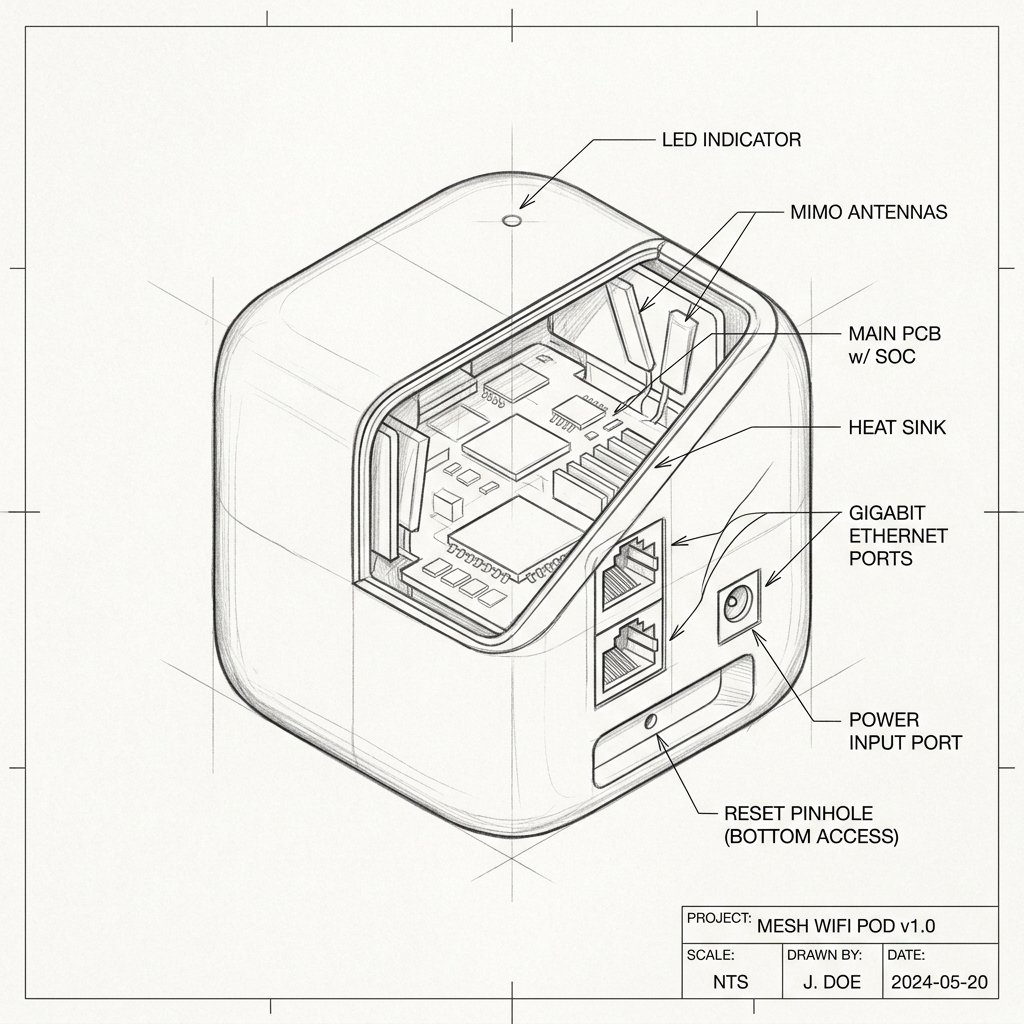
Cox Panoramic Wifi Pods 2.0 Reset Location
Locate the dedicated physical Reset pinhole or recessed button shown in the diagram. Use a paperclip or SIM eject tool to press and hold according to the steps below.
Reset Button / Pinhole
LED Blink Confirmation
Reset a Pod if it cannot be activated, remains offline, or needs to be added to a different Cox account.
Soft Reset
- Unplug the Pod from the electrical outlet.
- Wait 10–15 seconds.
- Plug the Pod back in.
- Wait several minutes for it to reconnect to the gateway.
- Check the Pod’s status in the Cox Panoramic Wifi app.
Factory Reset
- Keep the Pod plugged in and powered on.
- Locate the recessed reset button on the Pod.
- Use a paperclip or similar tool to press and hold the reset button for about 10–15 seconds.
- Release the button when the LED changes or begins flashing.
- Wait several minutes while the Pod reboots and clears its saved configuration.
- Open the Cox Panoramic Wifi app and activate the Pod again as a new device.