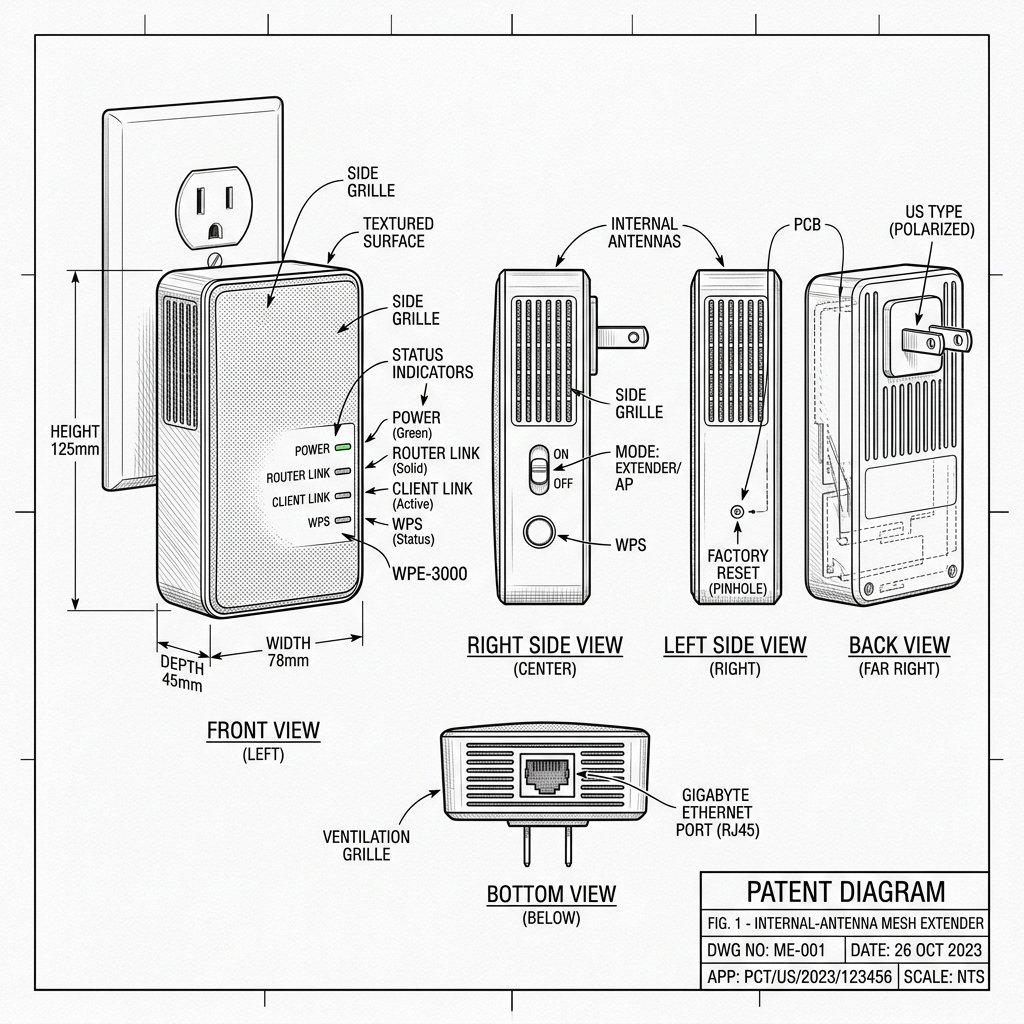
 Internal-Antenna Mesh Extender
Hardware Reset Reference
Netgear EX6400 Reset Location
Locate the dedicated physical Reset pinhole or recessed button shown in the diagram. Use a paperclip or SIM eject tool to press and hold according to the steps below.
Reset Button / Pinhole
LED Blink Confirmation
Reset Instructions for NETGEAR EX6400
Soft Reset (Power Cycle)
- Unplug the EX6400 from the power outlet.
- Wait 10–15 seconds.
- Plug it back in and wait for the Power LED to go solid green.
Factory Reset (Restore Defaults)
- Make sure the extender is powered on.
- Locate the recessed Reset button on the extender.
- Use a paperclip or pin to press and hold it for about 10 seconds.
- Release and wait roughly two minutes for the Power LED to stabilize.
- Run setup again using WPS, browser, or Access Point mode.
Warning: Resetting your NETGEAR extender can erase saved settings such as WiFi names, passwords, and custom options. Always try a simple power cycle (unplug, wait 10–15 seconds, plug back in) before performing a factory reset. If you do factory reset, make sure you know your router’s WiFi name and password, because you’ll need to set up the extender again from scratch.